
How to Create Digital Products You’ll Love & Sell

Digital products are one of the fastest ways to earn money online. Whether you’re a beginner, student, or side hustler, learning how to create or sell digital products can help you earn income from home. Unlike physical items, digital products can be sold repeatedly without inventory, making them low-cost, scalable, and ideal for passive income.
Many women and college students are now exploring passive income opportunities through digital products.
In this guide, you’ll learn everything from idea selection to design, promotion, and income growth, with practical examples.
What Are Digital Products?
Digital products are things people buy and use online. You create them once, and they can be sold over and over again. Examples include:
- eBooks
- Online courses
- Printable planners
- Canva templates
- Stock photos
- Guides and checklists
Did you know? Global digital product sales are expected to reach $496 billion by 2026. That shows more people are buying online content and learning materials. If you are new, first understand what digital products are and how they work before creating one.
Create Digital Products That Sell in 2026 Step by Step Guide
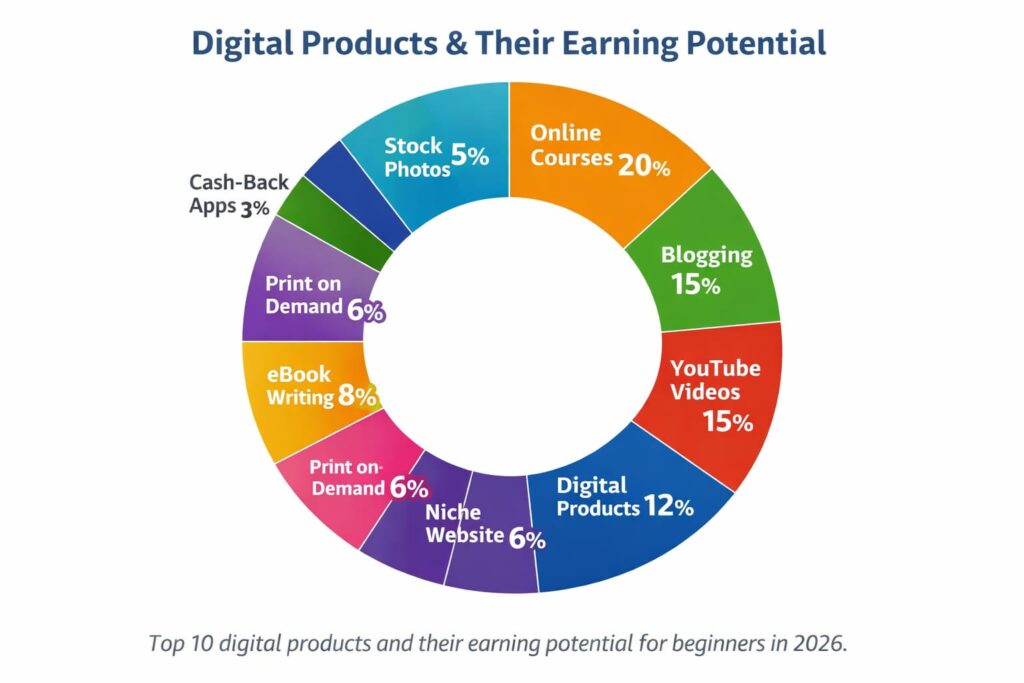
Discover how to create digital products that sell in 2026! Step-by-step tips for beginners, top product ideas, pricing strategies, and promotion techniques to earn passive income online.
Step 1 – Pick a Product Idea
The first step is to choose a product that solves a real problem.
Ask yourself:
- What problems do people face?
- What skills or knowledge can I share?
- Can my product help solve a problem?
Research Tools:
- Google search suggestions
- Amazon bestsellers
- Social media trends (TikTok, Instagram)
- Online forums (Reddit, Facebook groups)
Example ideas for beginners:
- Study planners
- Fitness guides
- Resume templates
- Social media templates
- Small eBooks
- If you need inspiration, check our guide how to sell digital product.
Step 2 – Choose Tools and Products
You don’t need expensive software. Here’s a quick guide:
| Product Type | Tool |
|---|---|
| eBooks | Google Docs, Canva |
| Printables | Canva, Adobe Express |
| Templates | Canva, Figma |
| Online Courses | Teachable, Thinkific |
| Stock Photos | Lightroom Mobile, Snapseed |
Tip: For Canva templates, start with a pre-made template and customize it to your audience. For more inspiration, check out these creative digital product ideas for beginners.
Step 3 – Design Your Product
Design is important. A well-designed product looks professional and helps you make more sales. Also read our post How to Make Etsy Spell Images to design your product.
Tips for beginners:
- Use easy-to-read fonts and layouts
- Add helpful images
- Include a table of contents for guides
- Keep it simple and easy to use
Pro tip: Imagine your customer opening it for the first time. Is it easy to understand?
Step 4 – Create a Catchy Title and Description
Your title and description should grab attention and show the benefits.
Example:
Ultimate Study Planner — Stay Organized & Boost Your Grades
Make sure the title:
- Uses emotional words (e.g., “Boost Your Grades”)
- Shows a clear benefit
- Includes keywords for SEO
Your description should include:
- What the product does
- Who it helps
- Specific benefits
- Bonuses or extras
Step 5 – Pricing Your Product
Pricing depends on the type and value:
- $5–$15: Printables, small templates
- $15–$50: eBooks, mini-courses
- $50–$200+: Full courses, bundles
Tip: Offer a free sample or bonus to attract buyers. Products priced $15–$50 tend to sell well for beginners.
Step 6 – Selling Your Digital Products
Now that your product is ready, it’s time to sell online. Here are some online platforms you can use:
- Etsy: Printables & templates
- Gumroad: Easy for beginners
- Shopify: Advanced e-commerce
- Teachable/Thinkific: Online courses
- Amazon Kindle: eBooks
Promotion Tips:
- Write blog posts
- Use social media (Instagram, TikTok, Pinterest)
- Send email newsletters
- Make YouTube tutorials
- Use paid ads (optional)
Pro tip: Combining different promotion channels can boost your sales. Digital products are also a great starting point for teens who want to earn money online, because they require little to no investment.
Top Digital Products to Create for Passive Income
| Digital Product | Time to Create | Price Range | Earning Potential | Best For |
|---|---|---|---|---|
| eBooks | 3–7 days | $10–$40 | Medium | Writers, educators |
| Printable Planners | 1–2 days | $5–$15 | Medium | Students, organizers |
| Canva Templates | 2–3 days | $10–$50 | High | Designers, marketers |
| Online Courses | 1–2 weeks | $50–$200+ | Very High | Experts, teachers |
| Stock Photos | 1–3 days | $5–$20 | Low–Medium | Photographers |
| Social Media Templates | 2–4 days | $15–$60 | High | Content creators |
| Resume Templates | 1–2 days | $10–$25 | Medium | Job seekers market |
| Budget Trackers | 1–2 days | $5–$15 | Medium | Finance niche |
| Notion Templates | 2–3 days | $10–$40 | High | Productivity users |
| Digital Guides | 3–5 days | $15–$50 | Medium | Beginners, bloggers |
How to Sell Digital Products Online
Selling digital products online is simple if you follow a clear process.
- Choose a Selling Platform
Select a marketplace like Etsy or Gumroad.
- Upload Your Product
Add your digital file such as an eBook, template, or printable.
- Write a Clear Description
Explain what the product does and how it helps buyers.
- Add Preview Images
Show screenshots or mockups so customers understand the product.
- Set the Right Price
Choose a price that matches the product value and market demand.
- Promote Your Product
Share it through social media, blogs, and email newsletters.
Real-Life Story: How a Student Made $1,200/Month
Sarah, a college student, wanted extra income without spending money. She noticed many students struggled to organize their study schedules, so she created a simple printable study planner on Canva. She listed it on Etsy for $10 and shared it on Instagram and a student Facebook group.
Within two weeks, Sarah earned her first $500. By updating designs and adding more templates regularly, she now makes over $1,200 per month from her digital products—all while balancing her studies. Many creators build digital products while enjoying the benefits of remote work.
Conclusion
Learning how to create digital products can open the door to a flexible and scalable online income. The best part is that you only need an idea, a simple plan, and the right tools to get started. From eBooks and templates to online courses and printables, digital products allow you to create once and sell many times.
Start small and focus on solving a real problem for your audience. Use simple tools like Canva or Google Docs, choose a platform such as Etsy or Gumroad, and promote your product consistently. With patience and effort, even a single digital product can grow into a steady source of passive income.
Many college students are using digital products as a simple way to build passive income while studying also read our guide passive income ideas for college students.
Take Action Today
Now it’s your turn. Pick one digital product idea today, create a simple version, and launch it online. Don’t wait for perfection—start small, learn from feedback, and improve as you grow.
If you found this guide helpful, share it with others who want to learn how to create digital products and start building their own online income stream.
FAQs: About Creating Digital Products
Digital products are items people buy and download online, such as eBooks, templates, planners, and online courses.
Use simple tools or apps like Canva or Google Docs to make planners, templates, or eBooks.
Printable planners, templates, checklists, and mini eBooks.
Platforms like Etsy and Gumroad.
Simple products: a few hours or days. Courses/eBooks: 1–2 weeks.
Yes. Sell once, earn repeatedly.
Pick a problem-solving idea, create with Canva or Google Docs, then sell on Etsy or Gumroad.